

Ever watched a new hire try to process an entire Order-to-Cash cycle in NetSuite for the first time? It's often a dizzying dance across Sales Orders, Item Fulfillment, and Invoices. Each step lives on a different page, sometimes even in a different NetSuite module, and the typical user just gets a link to a PDF manual. We can do better.
The Problem with ERPs (and NetSuite specifically)
NetSuite is an absolute powerhouse for businesses, but its depth and flexibility are a double-edged sword. For administrators, it’s a toolkit for precision. For end-users, especially those who aren't in it every day, it can feel like navigating a labyrinth designed by accountants who secretly hate intuitive UIs. And when a single business process — like fulfilling a custom sales order — spans three distinct NetSuite modules, the cognitive load skyrockets.
Why DoBeacon for NetSuite?
This is precisely where DoBeacon shines. Unlike traditional training documents or static videos, DoBeacon guides users in-app, step-by-step, no matter how many pages or modules their workflow touches. It’s not just for onboarding; it's for supporting the adoption of new features, reinforcing compliance, or for guiding users through critical processes like month-end close.
The Journey Starts: Mapping Your Workflow
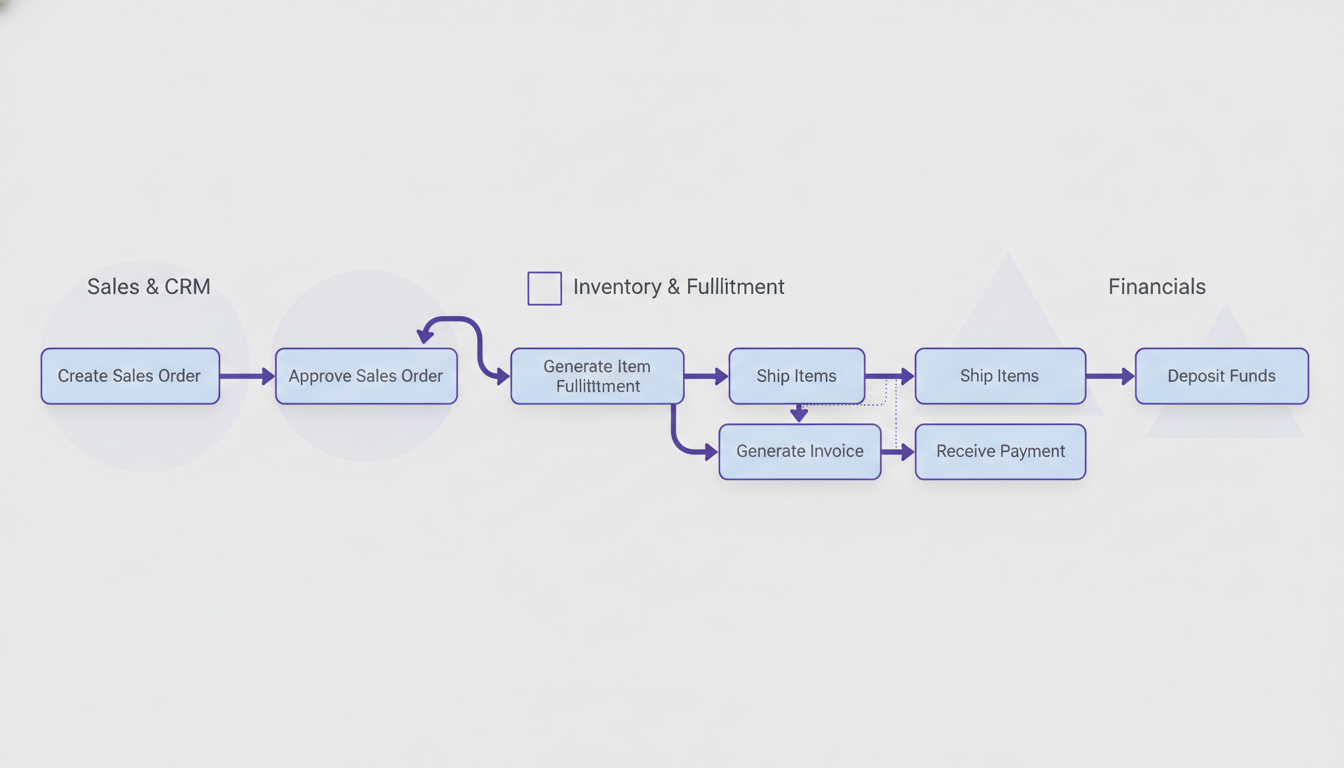
Before you even open DoBeacon, grab a whiteboard (or a mind-mapping tool; I'm a big fan of Miro for this kind of work) and map out the specific NetSuite workflow you want to simplify. Don't skip this step. Seriously, it's tempting to jump straight into building, but a clear map will save you hours. Let's take the "Order-to-Cash" journey:
- Create Sales Order
- Approve Sales Order
- Generate Item Fulfillment
- Pick/Pack/Ship Confirmation
- Generate Invoice
- Process Payment (optional, but often part of the cycle)
Building Your Multi-Module DoBeacon Tour
Step 1: The Launchpad
Every DoBeacon tour needs a starting point. For multi-module journeys, pick the first page of your workflow. For our Order-to-Cash, that's typically the Sales Order creation page. You’ll define the initial URL in DoBeacon, and the extension helps you build out the rest of the tour visually.
Step 2: Contextual Guidance
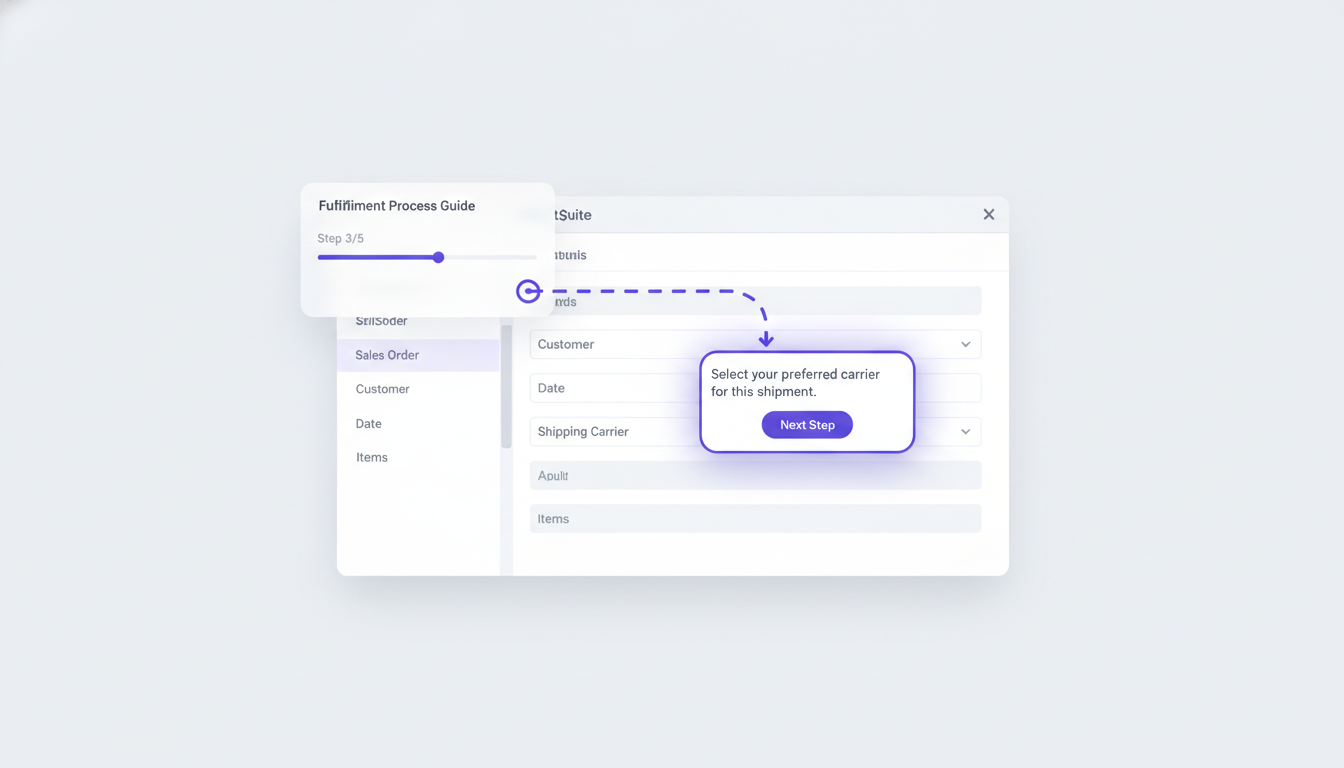
Once you're on the Sales Order page, use DoBeacon's visual builder to add tooltips and spotlight steps to guide the user through filling out fields, selecting customers, or adding items. For example, a tooltip could highlight the 'Customer' field, explaining any specific naming conventions your team uses.
Step 3: Crossing the Module Divide
Here’s where DoBeacon really flexes. When your user needs to move from, say, a Sales Order to an Item Fulfillment record, you don't need to end the tour and start a new one. By using a navigate step type, you can guide the user to a new URL and continue the tour. Your 'Next' button can prompt them to click the 'Fulfill' button on the Sales Order record. Once they land on the Item Fulfillment page, DoBeacon's next step is already waiting.
Step 4: Iteration and Refinement
Just like any good software, your DoBeacon tours will benefit from iteration. Build it, test it with a few users, and observe where they get stuck. Often, a single rephrased tooltip or an additional step can make a huge difference. Don't be afraid to experiment; you're iterating on a guide, not rewriting core ERP logic.
My Opinionated Take
Frankly, I think relying solely on traditional training documents for complex ERP workflows is a mistake. They're necessary for reference, sure, but they don't teach muscle memory or provide real-time support. It's like giving someone a blueprint and expecting them to build a house without ever having held a hammer. In-app guidance isn't a replacement for human training, but it's an incredibly powerful accelerant, allowing your experienced users to focus on exceptions, not basic hand-holding. It frees up your super-users to be problem-solvers, not just living manuals.
Real-World Impact
Imagine a scenario where a new warehouse associate needs to process a return. They start on the Customer Return Authorization (RMA) page, follow DoBeacon’s prompts to receive the item, then see guidance on how to create the Credit Memo, and finally, how to process the refund. All these steps, traditionally separate modules or sub-processes, flow as one cohesive journey. It can help reduce errors, accelerate training, and gives everyone more confidence.
Architecting multi-product or multi-module journeys in NetSuite with DoBeacon isn't just about making things easier; it's about supporting your team's efficiency, helping reduce errors, and ultimately, getting more value out of your substantial investment in NetSuite. Give your users the map and the guide, right inside the application.
Ready to guide your team through their most complex NetSuite workflows? Build your first tour for free at https://dobeacon.com/signup